IPO Allotment Status: How to Check IPO Share Allotment Online
When a company launches an Initial Public Offering (IPO), investors apply for shares during the IPO subscription period. After the bidding period closes, the company and its registrar complete the share allotment process. Investors can then check whether they have received shares or not.
Checking the IPO allotment status online is an important step for anyone who has applied for an IPO. The status tells you whether shares have been allotted to you, how many shares you received, or whether your application was unsuccessful.
This guide explains what IPO allotment means, when the status becomes available, and how to check IPO share allotment online using different methods.
What Is IPO Allotment?
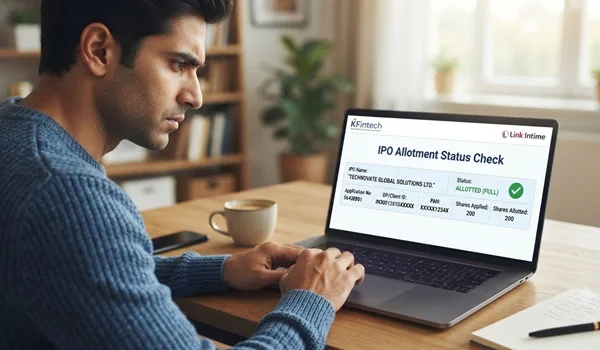
IPO allotment is the process through which shares are distributed among investors who applied for an IPO.
If the number of shares investors apply for is greater than the number of shares available, the IPO becomes oversubscribed. In such cases, not every applicant may receive shares.
The final allotment depends on the category of investor, the number of shares available, the subscription level and the applicable allotment rules.
Once the allotment is completed, investors can check their individual IPO allotment status.
When Can You Check IPO Allotment Status?
IPO allotment status is generally available after the allotment process has been completed by the IPO registrar.
The IPO schedule usually includes an allotment date. However, the exact time when the status becomes visible online can vary.
Investors should check the IPO timetable and wait until the allotment process is completed. Checking too early may show that the information is not yet available.
How to Check IPO Allotment Status Online
There are several ways to check IPO share allotment status online. Investors can generally use the IPO registrar’s website, stock exchange facility, or other official channels mentioned in the IPO documents.
- Check Through the IPO Registrar
The registrar appointed for an IPO maintains the application and allotment records.
To check your allotment status:
- Visit the official website of the IPO registrar.
- Select the relevant IPO.
- Enter the required application details.
- Select the appropriate identification option, such as PAN or application number.
- Enter the required details carefully.
- Submit the information.
- Your IPO allotment status should appear on the screen if the allotment information has been published.
The registrar may ask for details such as your PAN, application number or other application-related information.
- Check Through the Stock Exchange
IPO applicants may also be able to check allotment-related information through the relevant stock exchange’s official facility when available.
You may need to provide details such as:
- PAN
- Application number
- IPO name
- Other identification details requested by the exchange
After submitting the information, the system can display the applicable allotment status.
- Check Through Your Demat Account
If shares have been allotted to you, they are credited electronically to your linked demat account.
Investors can check their demat account after the allotment and credit process has been completed. The shares may appear in the holdings section once the credit has taken place.
However, the demat account should not be considered the only method for checking allotment. The official registrar or exchange status is useful for confirming the actual allotment result.
What Details Are Required to Check IPO Allotment?
The exact details required can differ depending on the registrar or platform. Commonly requested information includes:
- PAN number
- IPO application number
- Application or bid number
- Demat account-related details
- Captcha or verification information
Investors should enter the details exactly as provided during the IPO application.
What Does IPO Allotment Status Mean?
After checking your IPO status, you may see different results depending on the outcome.
Shares Allotted
If shares have been allotted, the status will generally show the number of shares allocated to your application.
For example, if you applied for 100 shares and received 50 shares, the allotment status may show 50 shares allotted.
No Shares Allotted
If your application did not receive any shares, the status may indicate that no shares were allotted.
In an oversubscribed IPO, some eligible applicants may not receive shares because the available shares are limited.
Partial Allotment
Depending on the applicable allotment process, an investor may receive fewer shares than applied for. The status will show the number of shares actually allotted.
What Happens to the Money If Shares Are Not Allotted?
If an investor does not receive IPO shares, the amount blocked for the application is generally released according to the applicable payment mechanism and process.
For applications using the ASBA or UPI-based process, investors should understand that the application amount may initially be blocked rather than immediately transferred as a final payment.
If shares are allotted, the required amount is debited according to the allotment. If there is no allotment, the blocked amount is released.
The exact timing can vary depending on the IPO process, bank, intermediary and payment system.
How to Check If IPO Shares Are Credited
After successful allotment, investors can check their demat account.
Follow these general steps:
- Open your demat or trading account.
- Go to the holdings or portfolio section.
- Look for the newly allotted company shares.
- Check the quantity credited to your account.
- Compare the quantity with your IPO allotment status.
The shares may appear only after the credit process has been completed, so there can be a difference between the time of allotment announcement and the time the shares become visible in the demat account.
Why Is IPO Allotment Not Showing?
Sometimes an investor may try to check the status but receive no result. There can be several reasons.
Allotment Has Not Been Finalised
The most common reason is that the allotment process is still underway.
Wrong Details Entered
An incorrect PAN, application number or other information can prevent the system from finding the application.
Website Traffic
On the allotment date, thousands or even millions of investors may try to check their status at the same time. Heavy traffic can temporarily affect website performance.
Status Not Yet Updated
Even after the allotment process is completed, it may take some time for the information to become available across different systems.
Investors should wait and check again using the official source.
What Happens After IPO Allotment?
IPO allotment is followed by several important steps before the shares begin trading on the stock exchange.
Generally, the process includes:
IPO closes → Allotment is finalised → Refund or fund release process → Shares credited to demat accounts → Listing on stock exchange
The exact schedule is provided in the IPO’s official documents and may vary from one issue to another.
IPO Allotment vs IPO Listing
IPO allotment and IPO listing are two different events.
IPO allotment tells you whether you received shares from the public issue.
IPO listing is when those shares begin trading on the stock exchange.
An investor must first receive an allotment before having IPO shares credited to their demat account. Once listed, the shares can generally be bought or sold through the normal stock-market mechanism, subject to applicable rules.
What Should Investors Do After Checking Allotment?
If shares are allotted, investors should verify the quantity and ensure that the shares are credited to the correct demat account.
If shares are not allotted, investors should check whether the application amount has been released or unblocked.
Investors should also keep their IPO application details until the complete process is finished. These details can be useful if there is any discrepancy or issue with the application.
Important Things to Remember
Before checking IPO allotment status, keep these points in mind:
- Use official sources whenever possible.
- Keep your PAN and application number available.
- Check the IPO’s stated allotment date.
- Do not share your banking password, OTP or trading password with anyone.
- Do not pay anyone to check IPO allotment status.
- Remember that IPO allotment does not guarantee a profit.
- Check your demat account after the shares are credited.
- Keep your application records until the IPO process is completely settled.
Conclusion
Checking IPO allotment status online is a simple process once the allotment has been finalised. Investors can generally check their status through the IPO registrar, relevant stock exchange facility or their demat account after the shares are credited.
The allotment result tells investors whether they received shares and, where applicable, how many shares were allotted. If no shares are allotted, the application funds are released according to the applicable payment process.
Understanding the IPO allotment process helps investors track their application properly and avoid confusion between application, allotment, fund release and stock-market listing.